Beste muziek voor woningvideo's (+ licentieregels)
Aug 7, 2026 · 12 min leestijd
De beste muziek voor een woningvideo past bij de sfeer van de woning en is netjes gelicentieerd, met een gids per sfeer en 5 royaltyvrije bronnen.
De beste muziek voor een woningvideo past bij de sfeer van de woning (cinematische strijkers voor een luxe villa, warme akoestische gitaar voor een gezinswoning, minimale elektronica voor een modern appartement) en komt uit een bron die daadwerkelijk voor commercieel gebruik is vrijgegeven. De juiste sfeer raken is maar de helft van het werk. De andere helft is uit de auteursrechtelijke problemen blijven, en daar gaat het bij de meeste makelaars mis: dat trending nummer van je persoonlijke Instagram-feed is hoogstwaarschijnlijk niet gelicentieerd voor de bedrijfspagina waar je het zo op wilt zetten.
Als je voor elke woning een video publiceert, moet die combinatie (de juiste sfeer, de juiste licentie) een gewoonte worden, geen eenmalige keuze die je maakt terwijl je scrollt naar "een lekker nummer". Hieronder lees je hoe je muziek voor een woningvideo kiest per woningtype, waarom trending audio op Instagram riskanter is dan het lijkt, en waar je tracks vandaan haalt die je zonder zorgen kunt gebruiken.
Waarom de soundtrack meer werk verzet dan je denkt
Video presteert nu al met afstand beter dan een advertentie met alleen foto's: video-advertenties krijgen volgens Inman 403% meer aanvragen dan advertenties met alleen stilstaande foto's. Muziek is een groot deel van de reden: het bepaalt het tempo van je montage, verraadt het prijssegment nog voordat er één kamer in beeld komt, en overbrugt de stiltes tussen clips die anders aanvoelen als een stille diavoorstelling.
De fout die de meeste makelaars maken, is de muziek als laatste kiezen, ná het monteren, en dan grijpen naar wat die week het hardst trending is in hun Reels-feed. Die omgekeerde volgorde is precies hoe een woning van €2 miljoen op de kop af wordt voorzien van een grappige audiomeme, of hoe een rustige kustwoning een agressieve trapbeat krijgt omdat die op dinsdag trending was. Kies de sfeer vóór je gaat filmen, dan wordt monteren ook makkelijker, want je monteert dan mét het ritme in plaats van ertegenin.
Muziek per woningsfeer: overzichtstabel
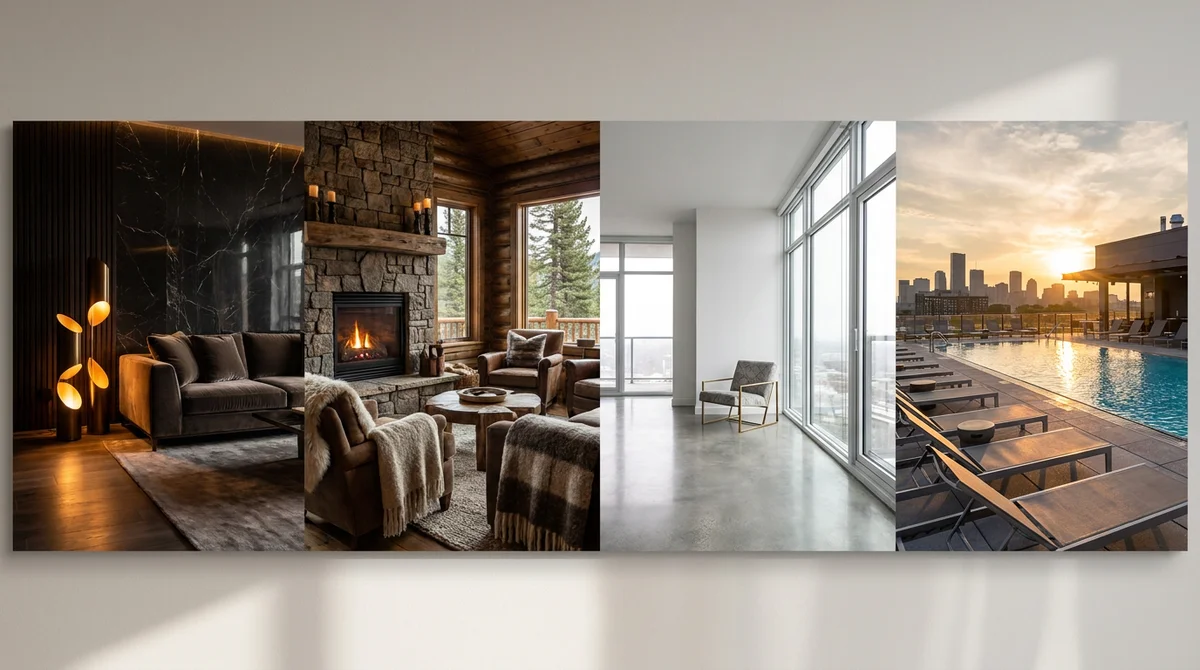
Elke woning heeft al een sfeer voordat er ook maar één noot bij komt: een verbouwde jarenvijftigwoning voelt anders dan een appartement in een hoogbouw in de stad, en een blokhut aan het meer voelt anders dan een nieuwbouwwoning in een gezinsvriendelijke buitenwijk. Match de track eerst op die sfeer, en stem daarna verder af op de specifieke woning.
| Sfeer woning | Genre / stijl | Tempo | Compose-preset |
|---|---|---|---|
| Luxe villa, high-end appartement | Cinematische strijkers, minimale piano | 70-90 BPM | Luxury Tour |
| Gezinswoning, doorsnee koopwoning | Warme akoestische gitaar, zachte percussie | 90-100 BPM | Warm & Cozy |
| Modern appartement, nieuwbouw | Minimale elektronica, strakke synth-pads | 95-110 BPM | Modern & Clean |
| Historisch pand, karakteristieke woning | Orkestraal, ingetogen strijkers | 80-95 BPM | Cinematic |
| Bouwgrond, kustwoning, wellness-gericht | Ambient pads, geen percussie | 60-80 BPM | Calm Ambient |
| Huurwoning, beleggingspand, Airbnb | Vrolijke pop of indiepop | 110-128 BPM | Energetic |
Twee regels gelden voor elke sfeer. Ten eerste: houd zang weg onder een voice-over of vertelling, songtekst concurreert met wat je zegt en maakt de video lastiger te volgen. Instrumentale of vocaal-lichte tracks werken voor vrijwel elk type woning. Ten tweede: match het tempo met je montagetempo: snelle cuts (een Reel met elke seconde een nieuw shot) vragen om een stuwende track, terwijl een trage, uitgesponnen rondleiding iets nodig heeft dat kan ademen.
Het licentieprobleem: waarom trending audio op Instagram risicovol is voor je bedrijfspagina
Dit is het onderdeel dat makelaars overslaan, en het is precies het onderdeel dat je geld kan kosten. Instagram (en Facebook) geeft persoonlijke profielen een enorme catalogus met trending nummers om vrij te gebruiken: dat is de audio waar je in elke Reel langs scrolt. Bedrijfs- en creatoraccounts, waaronder de meeste makelaarspagina's, krijgen die catalogus niet. Meta beperkt hen tot een aparte, kleinere Commercial Music Library, een geselecteerde set tracks die specifiek is vrijgegeven voor zakelijk gebruik.
Post je een trending nummer voor persoonlijk gebruik vanaf een bedrijfsaccount, dan gebeurt meestal een van drie dingen: de audio wordt stilletjes gedempt in je video, de post krijgt een auteursrechtclaim, of, in het slechtste geval, je pagina krijgt een waarschuwing die toekomstige posts in gevaar brengt. Geen van deze gevolgen is op zichzelf rampzalig, maar alle drie zijn volledig te vermijden, en geen ervan helpt je de woning te verkopen.
| Waar de video draait | Risico voor bedrijfsaccounts met trending/persoonlijke audio | Veiligere keuze |
|---|---|---|
| Instagram Reels / Facebook (bedrijfspagina) | Beperkt tot Meta's Commercial Music Library; andere tracks kunnen worden gedempt of gemarkeerd | Librarytrack vrijgegeven voor commercieel gebruik, of een AI-gegenereerde track |
| YouTube (Shorts of lange video's) | Content ID herkent en dempt ongelicentieerde muziek, ongeacht het aantal views | Royaltyvrije of AI-gegenereerde track |
| TikTok (bedrijfsaccount) | Vergelijkbare zakelijke scheiding als bij Meta; persoonlijke geluidsbibliotheek is niet volledig beschikbaar | TikToks commerciële geluidsbibliotheek, of je eigen gelicentieerde track |
| Je MLS-advertentiepagina / je eigen website | Geen enkele platformcontrole: het auteursrechtelijke risico is hetzelfde of nu 10 of 10.000 mensen kijken | Licentieer of genereer altijd, ga er nooit vanuit dat "het is maar mijn eigen site" veilig is |
De praktische oplossing is simpel: bouw één keer een kleine rotatie van correct gelicentieerde tracks (of genereer ze), en hergebruik die rotatie voor al je woningen in plaats van elke keer opnieuw op zoek te gaan naar een "trending" nummer. Het is minder spannend dan achter alles aan hollen wat viraal gaat, maar het is wel de versie die je niet alsnog opbreekt midden in een advertentiecampagne.
Royaltyvrije muziekbronnen vergeleken
Wil je liever licentiëren dan genereren? Zo verhouden de bekendste bronnen zich tot elkaar. Bij geen van deze hoef je de originele artiest op te sporen of een sync-licentie te onderhandelen: dat is precies het hele punt van een royaltyvrije bibliotheek.
| Bron | Kosten | Beste voor | Het addertje |
|---|---|---|---|
| YouTube Audio Library | Gratis | Af en toe een post, krap budget | Kleinere catalogus; populaire tracks worden door veel makers gebruikt |
| Epidemic Sound | ~€13-20/maand | Makelaars die wekelijks posten op meerdere platforms | Opzeggen kan de rechten op oudere, al gepubliceerde video's compliceren |
| Artlist | ~€10-17/maand (jaarabonnement) | Teams die onbeperkt willen downloaden | Jaarlijkse verplichting, geen maand-tot-maand optie |
| Soundstripe | ~€10-20/maand | Eenvoudig bladeren op sfeer/genre | Kleinere bibliotheek dan Epidemic Sound of Artlist |
| PremiumBeat | €30-60 per track | Eén uitgelichte video, zoals een woninglancering | Loopt snel op als je meerdere video's per week publiceert |
| AI-gegenereerd (Compose) | Inbegrepen in je videoworkflow | Elke woning, geen aparte licentiestap | Minder controle dan zelf een specifiek nummer uitzoeken |
Abonnementsbibliotheken zijn de moeite waard zodra je consistent publiceert: na een handvol video's telt de maandelijkse kost al niet meer echt mee. Pay-per-track-sites zijn prima voor één grote push, zoals een woninglancering, maar schalen niet als je elke woning als contentkans behandelt. Bouw je aan een bredere video- en montagestack? Onze roundup van AI-tools voor makelaars laat zien waar muziek en videogeneratie passen naast styling en fotobewerking.
AI-gegenereerde muziek: laat de software de woning scoren
De invalshoek die het licentievraagstuk echt helemaal wegneemt, is de track genereren in plaats van licentiëren. Compose is RoomLifts browsergebaseerde tool voor woningvideo's: het zet je advertentiefoto's om in een gepolijste videotour, met een timeline-editor, videopresets zoals property tour en voor/na, en AI-camerabeweging die stilstaande foto's laat bewegen tot vloeiende rondleidingsshots. Achtergrondmuziek zit in dezelfde workflow: je kiest een sfeer (Luxury Tour, Warm & Cozy, Modern & Clean, Cinematic, Calm Ambient of Energetic), en de tool genereert een track op maat van je montage, naast de AI-voice-over die de hoogtepunten van je woning voorleest.
Dat is om twee redenen meer dan alleen gemak. Ten eerste hoef je helemaal niets uit te zoeken op licentiegebied: je hoeft niet te checken of een track is vrijgegeven voor het platform waar je op post, want hij is speciaal voor deze video gegenereerd. Ten tweede komen video, voice-over en muziek allemaal uit één workflow in plaats van drie losse tools (een editor, een stockbibliotheek en een tekst-naar-spraak-app), en dat is het verschil tussen één woningvideo per week publiceren en er een maken voor elke woning die je aanneemt. Compose kan foto's en gegevens ook direct uit een advertentie-URL halen en exporteren in de beeldverhoudingen die je nodig hebt (16:9 voor de MLS, 9:16 voor Reels en TikTok, 1:1 of 4:5 voor feedposts) zodat dezelfde brontvideo overal werkt zonder opnieuw te monteren.
Zet een woning om in een video mét muziek en voice-over, klaar om te posten, met Compose: geen aparte muzieklicentie nodig.
Stage your first room in 20 seconds. No design skills needed.
Een simpel proces voor elke woning
Zodra je een sfeer en een bron hebt gekozen, is de workflow per woning kort:
- Kies eerst de sfeer, vóór je filmt of monteert, met de tabel per woningtype hierboven.
- Pak de track uit je rotatie (gelicentieerde bibliotheek of AI-gegenereerd) in plaats van te bladeren door trending audio.
- Match de lengte met de montage: 15-30 seconden voor een Reel, 60-90 seconden voor een highlight-clip, 2-3 minuten voor een volledige rondleiding.
- Houd het instrumentaal als je er een voice-over overheen legt.
- Hergebruik dezelfde rotatie voor al je woningen in plaats van steeds opnieuw muziek te zoeken: consistentie wordt zo ook onderdeel van je persoonlijke merkgeluid.
Dat is dezelfde discipline die het verschil maakt tussen makelaars die één video per jaar posten en degenen die elke woning als een week aan content behandelen: een herhaalbaar systeem wint het altijd van een verse beslissing elke keer opnieuw. Wil je meer weten over video omzetten in een leadgeneratie-gewoonte in plaats van een eenmalig project, lees dan onze gids over videomarketing voor makelaars.
Fouten waardoor video's gedempt of gemarkeerd worden
Een paar gewoontes veroorzaken stilletjes de meeste licentieproblemen waar makelaars tegenaan lopen:
- Grijpen naar wat trending is op je persoonlijke feed en het vanaf de bedrijfspagina posten. Zodra het een bedrijfsaccount is, gelden andere regels.
- Denken dat een laag aantal views je beschermt. Content ID en de audioherkenning van Meta kijken niet naar hoeveel mensen hebben gekeken voordat ze een track markeren.
- Je abonnement laten verlopen op een bibliotheek die je voor oudere video's gebruikte, en je dan afvragen waarom een oude post ineens zijn geluid kwijt is.
- Dezelfde drie viral nummers gebruiken als elke andere makelaar in de markt. Zelfs als het correct gelicentieerd is, laat generieke trending audio elke woning hetzelfde klinken.
- De muziek niet op maat maken, waardoor een track midden in een frase afkapt in plaats van uit te faden bij het laatste shot, een klein detail dat een montage onaf laat ogen.
Alles bij elkaar
Muziek voor woningvideo's komt neer op twee keuzes in de juiste volgorde: kies eerst de sfeer die bij de woning past, en pak dan de track uit een bron die daadwerkelijk gelicentieerd is voor een bedrijfsaccount, nooit van wat er toevallig trending is op je persoonlijke feed. Bouw per sfeer een kleine rotatie van vrijgegeven tracks, of laat een tool als Compose er automatisch één genereren die bij de woning past, en je hoeft nooit meer telkens opnieuw een muziekkeuze te maken zodra je een nieuwe woning post.
Veelgestelde vragen
Wat is de beste muziek voor woningvideo's?
De beste muziek voor een woningvideo past bij de sfeer van de woning: cinematische strijkers voor luxe villa's, warme akoestische gitaar voor gezinswoningen, minimale elektronische beats voor moderne appartementen, en vrolijke pop voor huurwoningen of Airbnb-tours. Tempo is belangrijker dan genre: houd het bij een rondleiding op 90-110 BPM, zodat de montage rustig aanvoelt in plaats van gehaast. Tools zoals Compose genereren automatisch een track die bij de woning past.
Mag ik trending Instagram-nummers gebruiken in een woningvideo?
Niet zonder risico, als je post vanaf een bedrijfsaccount. Meta beperkt bedrijfs- en creatoraccounts tot de Commercial Music Library, een kleinere, vrijgegeven subset van de volledige catalogus die persoonlijke profielen wel mogen gebruiken. Post je een trending nummer voor persoonlijk gebruik vanaf een bedrijfspagina, dan loop je het risico dat je video wordt gedempt, verwijderd, of dat je pagina een auteursrechtwaarschuwing krijgt.
Waar vind ik royaltyvrije muziek voor woningvideo's?
Vijf gangbare bronnen: de gratis YouTube Audio Library, abonnementsbibliotheken zoals Epidemic Sound en Artlist (ongeveer €10-20/maand), pay-per-track-sites zoals PremiumBeat (€30-60/track), en AI-gegenereerde muziek die ingebouwd zit in tools als Compose, die een track maakt die bij de woning past zonder enige licentiecheck.
Heb ik een muzieklicentie nodig om een woningvideo op social media te posten?
Ja, als de track commercieel auteursrechtelijk beschermd is en je post vanaf een bedrijfsaccount of hem als advertentie gebruikt. Royaltyvrije bibliotheken en AI-gegenereerde tracks hebben gebruiksrechten al inbegrepen, dus is er geen aparte licentieaankoop nodig: dat is precies waarom ze zo aantrekkelijk zijn voor makelaars die meerdere video's per week publiceren.
Hoe lang moet achtergrondmuziek zijn voor een rondleidingsvideo?
Match het met de montage: 15-30 seconden voor een Reel- of TikTok-clip, 60-90 seconden voor een highlight van één kamer, en 2-3 minuten voor een volledige rondleidingstour. Laat de track loopen of crossfaden in plaats van hem abrupt af te breken, een abrupte muziekafkap is namelijk een van de duidelijkste tekenen van een amateuristische montage.
Kan AI achtergrondmuziek genereren voor woningvideo's?
Ja. Compose, RoomLifts tool voor woningvideo's, genereert AI-achtergrondmuziek die bij de woning past, in dezelfde workflow waarmee je de videotimeline bouwt, naast AI-voice-over en camerabeweging. Je kiest een sfeer, zoals Luxury Tour of Energetic, en krijgt een track op maat van je montage, zonder licentievragen om uit te zoeken.
Klaar om je woningen te transformeren?
Style je eerste kamer in 20 seconden. Geen ontwerpvaardigheden nodig.