
47 Real Estate Social Media Post Ideas (Beyond Listings)
Jun 29, 2026 · 8 min read
47 real estate social media post ideas beyond listings, educational, before/after, and personal-brand posts that turn every property into a week of content.

If you only post listings, you are leaving most of your reach on the table. The agents who win on social media treat every property as raw material for a week of content, listing reveals, before/after transformations, educational tips, and personal-brand moments. Below are 47 real estate social media post ideas grouped by goal, plus a simple system for turning one listing into seven posts so you never stare at a blank caption box again.
The core idea: every listing becomes content. A single photo of an empty room can become a before/after reel, a three-style carousel, a staging tip, and a "guess the asking price" poll. Here is how to build that engine.

The Content Mix: Stop Posting Only Listings
Before the list, get the ratio right. The most common mistake agents make is posting nothing but active listings, which limits your audience to the small slice of people actively shopping this month. Everyone else scrolls past. A balanced feed earns followers between transactions, so you are top of mind when they are ready.
| Content type | Share of posts | Goal |
|---|---|---|
| Educational / value | ~40% | Build trust, grow reach, get saved and shared |
| Listings | ~30% | Showcase inventory, attract buyers and sellers |
| Before / after | ~20% | Prove your value visually, highest engagement |
| Personal brand | ~10% | Make you memorable and human |
Use this as a guide, not a rule. The point is simple: most of what you post should give value or tell a story, not just say "new listing."
Listing Post Ideas (Make Each Listing Work Harder)
These go beyond the standard photo dump. Each one is a different angle on a property you already have.
- New listing reveal, lead with your best room, not the exterior.
- Coming soon teaser, one detail shot, "full reveal Friday."
- Just listed carousel, best 6 to 8 photos, strong first frame.
- Just sold / under contract, social proof that you close.
- Open house invite with date, time, and one hero shot.
- Price drop framed as opportunity, not desperation.
- Feature spotlight, the chef's kitchen, the primary suite, the yard.
- Room-by-room walkthrough as a saved highlight or reel.
- "Guess the price" poll in Stories to drive interaction.
- Listing video tour set to trending audio.
- Neighborhood spotlight, schools, coffee, commute, parks.
- Floor plan post, buyers love understanding flow.
- "What this listing taught me", a quick market lesson.
One listing covers a dozen ideas. For more on converting that attention into actual contacts, see our guide to AI-powered real estate lead generation.
Educational Post Ideas (The Reach Engine)
Educational content gets saved and shared, which is what platforms reward. It also positions you as the expert long before someone is ready to transact.
- 5 mistakes first-time buyers make.
- How to read a market report in plain language.
- Buy vs. rent in your specific market this year.
- What "pre-approved" actually means.
- Closing costs explained with a real example.
- Staging tips that cost under $100.
- How to price a home so it sells.
- Seasonal selling tips, best month to list locally.
- Mortgage rate update with one takeaway.
- What inspectors look for in older homes.
- Negotiation moves that won your buyer the deal.
- Local market stat of the week as a clean graphic.
- "Ask me anything" prompt to surface buyer questions.
When someone is choosing which tools or pros to trust, useful content does the convincing. If you want to speed up production, our roundup of the best AI tools for real estate agents covers what to add to your stack.
Before/After Post Ideas (Your Highest-Engagement Format)
This is the category that turns every listing into content. Before/after posts stop the scroll because they tell a complete story in one swipe, and they make your value undeniable. Staging is well documented to move homes: the National Association of Realtors reports staged homes sell faster than non-staged ones, the Real Estate Staging Association reports staged homes sell for 1 to 5% more on average, and 81% of buyers say staging makes it easier to picture a home as their own.
Here is the kicker: with AI virtual staging you can produce these transformations for about $1 to $5 per image in under 60 seconds, versus $25 to $100 for designer-led editing or $500 to $3,000 to physically stage a room. The best-performing content is also the cheapest to make.
Drag the slider to see exactly the kind of transformation that anchors these posts:
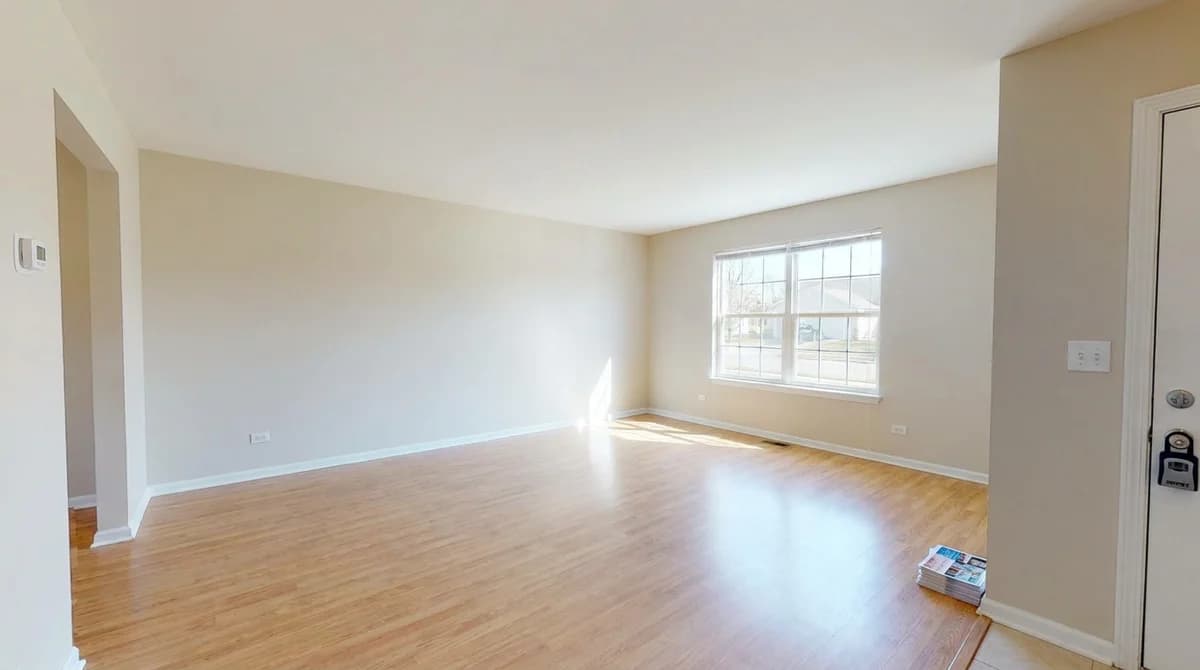
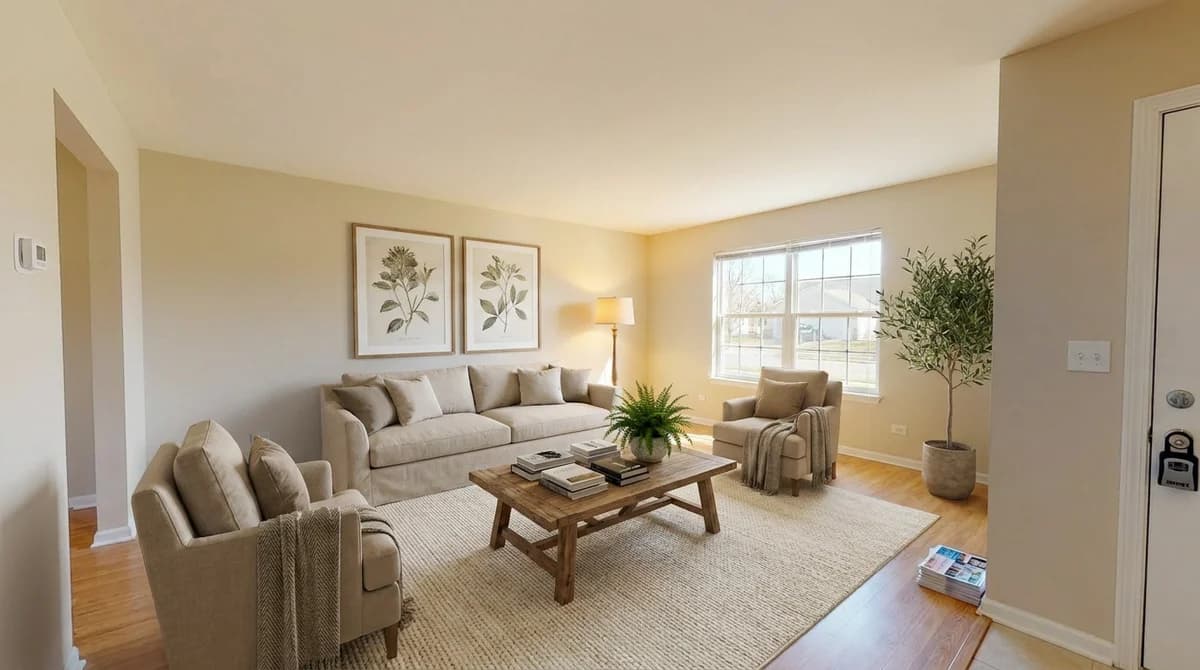
- Empty vs. staged, the classic, always works.
- Same room, three styles, Scandi, modern, traditional in one carousel.
- Dated vs. refreshed, show a tired room reimagined.
- "Swipe to furnish" reel of a bare room filling in.
- Buyer's-eye view, "here's the potential."
- Cluttered vs. designed to show what staging fixes.
- Exterior glow-up, twilight or landscaped curb appeal.
- Style poll, "which version would you list?"
- "60-second staging" time-lapse of the AI render.
- Vacant land or shell with a visualized finished look.
Every empty room you photograph is a before/after waiting to happen. You can turn any listing photo into a staged version at our virtual staging tool for real estate and post the pair the same day.
Personal-Brand Post Ideas (People Hire People)
Real estate is a relationship business. These posts make you memorable so that when a friend asks "do you know a good agent?", your name comes up.
- Your origin story, why real estate.
- Day in the life as a reel.
- Client win, a closing photo and the backstory (with permission).
- Behind the scenes of a shoot or showing.
- Your favorite local spot, coffee, trail, restaurant.
- A lesson a deal taught you.
- Team or vendor shoutout, lenders, inspectors, stagers.
- Answer a DM publicly, common question, helpful answer.
- Milestone, anniversary, award, homes sold this year.
- Hot take on a local market trend.
- Gratitude post to past clients and referrals.
How to Turn One Listing Into Seven Posts
This is the system that makes the whole list sustainable. Pick one new listing and harvest a week of content from it:
| Day | Post | Type |
|---|---|---|
| Mon | Listing reveal, lead with best room | Listing |
| Tue | Before/after staging of one room | Before/after |
| Wed | Feature spotlight (kitchen, view, yard) | Listing |
| Thu | Neighborhood guide for that area | Educational |
| Fri | Same room in 3 styles, style poll | Before/after |
| Sat | Open house invite | Listing |
| Sun | Behind-the-scenes of the shoot | Personal |
Seven posts, one property, zero blank-page panic. The two before/after slots are the easiest to fill because AI staging produces a finished image from a single photo in under a minute, no furniture, no photographer revisit, no second appointment.
Frequently Asked Questions
What should real estate agents post on social media?
Mix four content types: listings, educational tips, before/after transformations, and personal-brand posts. A simple ratio is roughly 40% educational and value content, 30% listings, 20% before/after, and 10% personal. Posting only listings is the most common mistake because it limits your reach to people already in the market.
How often should a realtor post on social media?
Aim for 3 to 5 posts per week plus daily Stories, and prioritize consistency over bursts. A reliable shortcut is turning one listing into 5 to 7 posts, reveal, before/after, feature, neighborhood, and behind-the-scenes, so you never start from scratch.
What is the best type of real estate post for engagement?
Before/after transformations drive the most engagement because they tell a visual story in one swipe. With AI virtual staging you can create them in under 60 seconds for about $1 to $5 per image, making the highest-performing format also the cheapest to produce.
How do I make real estate content without a new listing?
Use educational posts, personal-brand stories, and AI-generated before/after staging of any room photo. A single empty room can become a carousel showing three different design styles, a full post created from one photo.
Do before and after posts really work for real estate?
Yes. They make the value of staging visible instantly, and staging is documented to help homes sell: the National Association of Realtors reports staged homes sell faster, and 81% of buyers say staging helps them picture a home as their own. Showing that transformation proves your expertise.
How much does it cost to create real estate before/after content?
Almost nothing with AI virtual staging, roughly $1 to $5 per image in under a minute, versus $25 to $100 for designer-led editing or $500 to $3,000 per room for physical staging. A week of before/after content can cost less than a single coffee run.
Ready to transform your listings?
Stage your first room in 20 seconds. No design skills needed.